
SiteShoter is a free and portable webpage screenshotting tool developed by NirSoft. It allows you to capture screenshots of entire web pages automatically, without needing to open a visible browser window.
SiteShoter | Portable Webpage Screenshot Tool
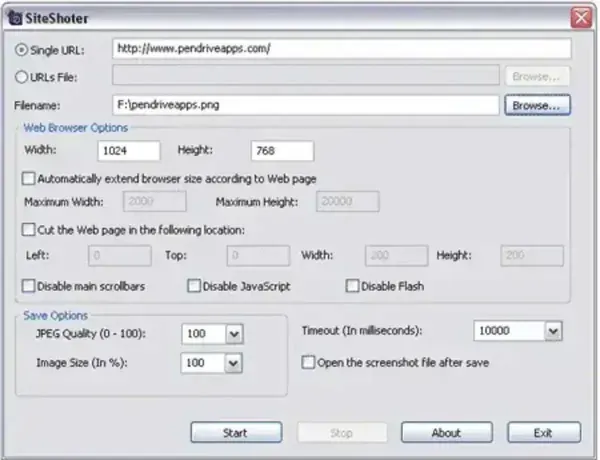
SiteShoter works by creating a hidden instance of Internet Explorer, loading the specified URL, and saving a full page screenshot once the page has finished rendering. Because the browser window runs invisibly in the background, screenshots can be captured silently without user interaction.
This makes the software especially useful for automation, documentation, website archiving, monitoring visual changes, or batch capturing screenshots from a list of URLs.
What Can SiteShoter Capture?
SiteShoter captures the full content of a web page, not just the visible portion of the screen. It automatically scrolls and renders the entire page before saving the image.
Supported output formats include:
- PNG
- JPG
- BMP
- TIFF
- WEBP
Key Features
- Full Page Screenshots: Captures the entire webpage content automatically
- Hidden Browser Rendering: Uses a background Internet Explorer window with no visible UI
- GUI and Command Line Support: Can be used interactively or automated via scripts
- Batch Processing: Capture screenshots from multiple URLs
- Portable: No installation required
- Lightweight: Very small file size with minimal system impact
Command Line Screenshot Support
In addition to its graphical interface, the screen capturing tool includes full command line support. This allows advanced users and system administrators to automate webpage screenshots using scripts, scheduled tasks, or batch files.
Common use cases include:
- Scheduled website snapshots
- Automated monitoring of visual changes
- Bulk webpage archiving
- Documentation generation
Limitations to Be Aware Of
- Uses Internet Explorer rendering engine, which may not fully support modern web technologies
- May not render JavaScript heavy or dynamically loaded content accurately
- Requires Internet Explorer components to be present on the system
Because of these limitations, SiteShoter works best for static or moderately dynamic web pages.
Who Should Use SiteShoter?
- Web developers capturing layout snapshots
- System administrators automating website screenshots
- Users archiving web pages visually
- Anyone needing silent, unattended webpage screenshots
SiteShoter Portable Specs | Official Site | Download
- Author's Website: Project Page
- Developer: Nir Sofer (NirSoft)
- License: Freeware
- Supported Operating Systems: Windows XP through Windows 11
- Extracted File Size: 116 KB
- Editor's Rating: 4 Star
- Category: Screen Capture, Web Utilities
- Downloading: SiteShoter Download
Final Thoughts
SiteShoter is a simple yet powerful webpage screenshot utility that excels at unattended and automated captures. While it may not handle modern JavaScript heavy websites perfectly, its portability, command line support, and tiny footprint make it an excellent tool for static page capture and automation tasks.
For users needing fast, no nonsense webpage screenshots directly from a USB drive, it remains a reliable choice.
